Passport Photo Requirements by Country: Complete Guide
Complete passport photo requirements for major countries including the US, UK, EU, Canada, and Australia. Sizes, backgrounds, and rules explained.
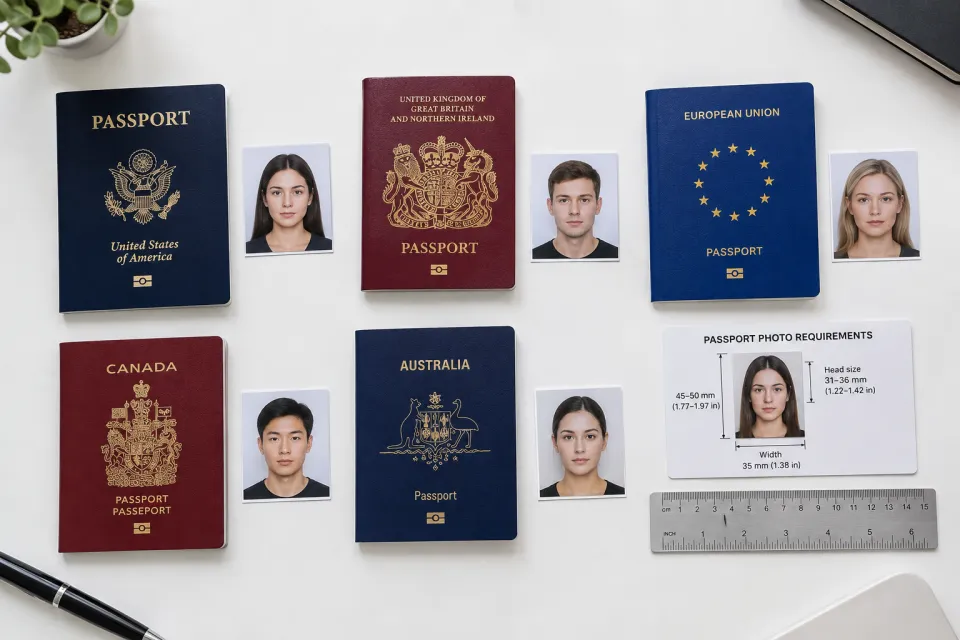
Getting a passport photo wrong is one of the most frustrating bureaucratic experiences — you submit your application, wait weeks, and receive a rejection letter because your photo was 2 millimeters off or your background wasn't quite the right shade of white. Each country has specific requirements for passport and ID photos, and the rules vary more than you'd expect.
This guide covers the passport photo specifications for major countries and explains how AI headshot tools can help you generate compliant photos for ID and passport use without a trip to the photo booth.
Why Passport Photo Requirements Matter
Passport and visa photos are rejected at surprisingly high rates. The U.S. Department of State rejects approximately 20% of passport photo submissions — not for security reasons, but for failing to meet technical specifications. Common rejection reasons include incorrect size, wrong background color, improper head positioning, shadows on the face, and digital alterations that change your appearance.
Understanding the requirements before taking or generating your photo saves weeks of processing delays and the cost of resubmitting applications.
United States Passport Photo Requirements
Size: 2 × 2 inches (51 × 51 mm)
Head size: Head must measure 1 to 1⅜ inches (25 to 35 mm) from chin to top of head
Background: Plain white or off-white
Recency: Taken within the last 6 months
Expression: Neutral expression or natural smile, both eyes open
Glasses: Not permitted (since 2016)
Head coverings: Only for religious purposes, face fully visible
Digital specs: 600 × 600 to 1200 × 1200 pixels, JPEG format, under 240 KB for online submissions
The U.S. requirements are strict about head positioning — your head must be centered and face the camera directly with a full-frontal view. Tilting, turning, or angled shots are rejected. No uniforms except daily religious attire.
United Kingdom Passport Photo Requirements
Size: 35 × 45 mm
Head size: Face must occupy 29 to 34 mm from chin to crown
Background: Plain cream or light grey
Recency: Taken within the last month
Expression: Neutral, mouth closed, eyes open and visible
Glasses: Permitted if eyes are clearly visible (no glare)
Head coverings: Religious purposes only
Special rules: No shadows on face or background, no hair covering eyes, no red-eye
The UK is notably stricter about recency — photos must be taken within the last month, compared to six months for the U.S. Digital alterations that change your appearance are prohibited.
European Union (Schengen) Requirements
Most EU countries follow the ICAO (International Civil Aviation Organization) standard:
Size: 35 × 45 mm
Head size: 70-80% of the photo height
Background: Light grey, light blue, or white (varies by country)
Expression: Neutral, mouth closed
Recency: No older than 6 months
Glasses: Generally discouraged, some countries prohibit them
Biometric standards: Full frontal view, both ears visible (recommended), no smiling showing teeth
Individual EU countries add variations. Germany requires light grey backgrounds. France accepts light grey or white. Netherlands specifies light grey only. Always check your specific country's requirements before submitting.
Canada Passport Photo Requirements
Size: 50 × 70 mm
Head size: 31 to 36 mm from chin to crown
Background: Plain white or light-colored
Recency: Taken within the last 6 months
Expression: Neutral or slight natural smile, both eyes open
Glasses: Not permitted
Special rules: Photo must be taken by a commercial photographer or passport photo service (though AI-generated photos meeting specifications are increasingly accepted for online renewals)
Canada's larger photo size (50 × 70 mm) is unique among major countries and requires specific cropping that standard photo booths sometimes get wrong.
Australia Passport Photo Requirements
Size: 35 × 45 mm
Head size: 32 to 36 mm from chin to crown
Background: Plain white or light grey
Recency: Taken within the last 6 months
Expression: Neutral, mouth closed
Glasses: Not permitted
Special rules: A licensed photographer must endorse the photo (for paper applications)
Australia maintains the endorsement requirement for paper applications, though online passport renewals accept digital photos meeting specifications without endorsement.
Common Requirements Across All Countries
Despite country-specific variations, several rules are nearly universal:
How AI Headshot Tools Help with Passport Photos
AI headshot generators with passport photo capabilities can produce compliant photos by applying country-specific size, background, and framing requirements automatically. Instead of visiting a photo booth, paying $15, and hoping the result meets specifications, you can:
1. Take a clear selfie following basic lighting and framing guidelines
2. Visit the generate page at aiheadshot.online
3. Select the passport/ID style with your country specifications
4. Download a compliant photo sized and formatted correctly
AI passport photos handle the technical requirements — exact dimensions, background color, head positioning, and file format — that cause most rejections. You provide a clear face photo; the AI handles the bureaucratic precision.
When to Use AI vs. a Photo Service
AI works well for:
Visit a photo service for:
Tips for a Compliant Passport Photo
Whether using AI or a photo booth, follow these guidelines for the source photo:
Digital vs. Physical Submission Requirements
The passport photo landscape has shifted dramatically since 2020. Over 40 countries now accept digital photo uploads for online passport renewal, including the United States (via travel.state.gov), the United Kingdom (Gov.uk), Canada, Australia, Germany, and most EU member states. If you're renewing rather than applying for the first time, digital submission is often the fastest path — no post office visit required.
Digital submissions impose their own technical rules beyond the visual requirements covered above. Nearly all governments require JPEG format exclusively — PNG, HEIC, and TIFF files are rejected automatically. File size limits vary significantly: the U.S. State Department caps uploads at 240 KB, the UK Home Office accepts between 50 KB and 10 MB, and Canada's online portal requires files under 4 MB at a minimum resolution of 600 × 750 pixels. Pixel dimensions must match exact country specifications; submitting a U.S. 2×2 photo scaled incorrectly is one of the top five digital rejection reasons.
If your application requires physical printed photos — common for first-time applications, visa submissions to certain embassies, and countries without online renewal — print quality matters as much as digital specs. Use glossy photo paper for most passport applications; matte finishes can appear washed out under scanner lighting. Professional print labs (CVS, Walgreens, Shutterfly) use dye-sublimation printers that produce sharper edges and more accurate color than home inkjet printers, which tend to introduce banding and color shifts that trigger rejections.
Home printing vs. professional services: A home inkjet on standard paper typically costs $0.10–$0.30 per photo but carries a higher rejection rate due to resolution and color inconsistencies. Professional print kiosks charge $0.29–$0.50 per 4×6 sheet with passport-quality output. The difference is most visible at passport office review, where officers scrutinize edge sharpness and background uniformity.
AI tools like ProShotAI address both channels simultaneously. After generating a compliant digital file, use the Print Layout feature on the generate page to arrange multiple correctly sized photos on a standard 4×6 inch sheet — ready for printing at any pharmacy photo counter or home printer without manual cropping.
Multiple Countries, One Selfie
If you're applying for passports or visa applications in multiple countries, AI tools let you generate correctly sized photos for each from a single selfie. A U.S. 2×2 inch photo, a UK 35×45 mm photo, and an EU-standard biometric photo can all be produced from the same source image — each cropped, sized, and background-adjusted to meet that country's specifications.
Browse passport headshot options and explore the full style library at aiheadshot.online. Try ProShotAI Free and generate compliant passport photos in seconds.
Related Resources
Try ProShotAI Free
Get your professional headshot in seconds. 2 free credits, no sign-up required.